Understanding Threads in Node.js

One concept that confuses developers who are new to Node.js is how it can be single-threaded and non-blocking, support asynchronous operations, and still use multiple threads for certain tasks. To understand this, we need to look at how Node.js works under the hood.
What happens under the hood?
Node.js is built on a few important components. V8, the JavaScript engine developed by Google, executes JavaScript. Node.js also includes native C/C++ code and uses libuv to provide its event loop and asynchronous I/O support, including a worker thread pool for certain operations. When a Node.js program starts, it runs in a process. In a typical Node.js application, your JavaScript callbacks run on one main thread, coordinated by the event loop. That does not mean every operation must run on that thread. When you start an asynchronous operation, Node.js can hand the work off to the operating system or to libuv's worker pool, depending on the operation. When the work completes, its callback is scheduled to run on the event-loop thread.
The event loop, the operating system, and the thread pool
For example, network I/O such as an HTTPS request is generally handled through the operating system's networking facilities; it does not normally use libuv's thread pool. By contrast, many asynchronous file-system APIs use the libuv thread pool. Some asynchronous cryptographic APIs, including crypto.pbkdf2(), use it too. The libuv thread pool has four threads by default. You can change its size with the UV_THREADPOOL_SIZE environment variable, but set it before the Node.js process starts. Changing process.env.UV_THREADPOOL_SIZE from inside your application is not guaranteed to work because the pool may already have been initialized. Increasing the pool size can help some workloads, but it also increases resource use and is not automatically a performance improvement.
A small example
This example starts several password-hashing operations, an HTTPS request, and a file read. Notice that the hash operations and the asynchronous file read can compete for the same libuv thread pool, while the network request follows a different path.
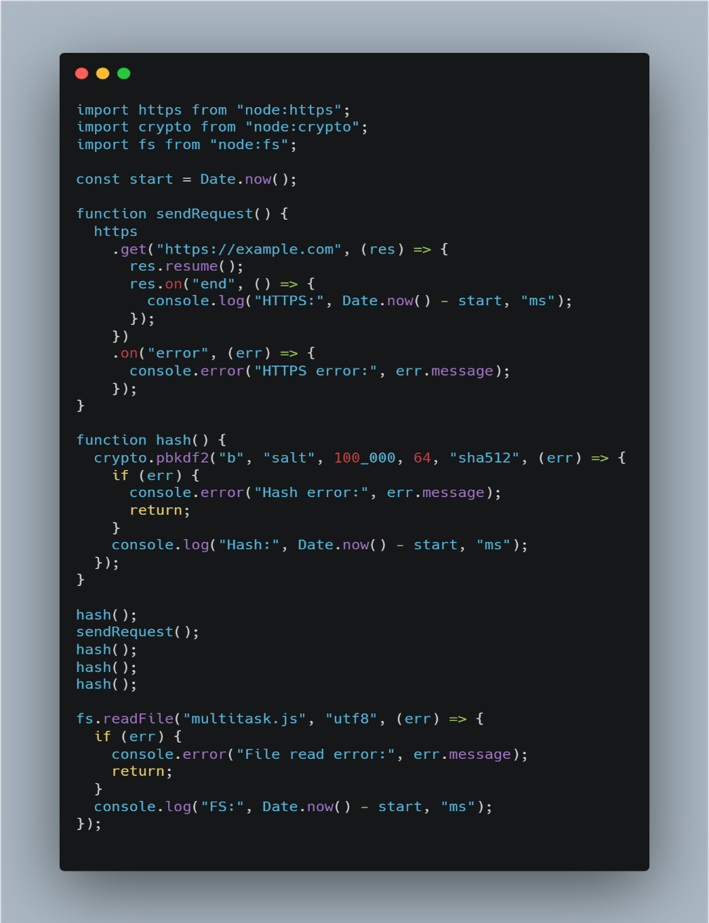
To experiment with a different pool size, set the environment variable before launching Node.js. For example: UV_THREADPOOL_SIZE=5 node multitask.js. The exact completion times will vary with your machine, network, and workload, so the order of the log messages is not guaranteed.
The key takeaway
Node.js does not run all work on multiple threads. In a typical application, your JavaScript runs on one main thread, while the operating system and libuv's worker pool handle different kinds of asynchronous work. This combination lets Node.js handle many I/O operations efficiently without blocking the event loop, provided you avoid long-running synchronous work on that main thread.
Comments
Join the discussionNo comments yet. Be the first to comment.